

TorchTiger Engineer — Community
Your key. Your account. Your data.
A free ServiceNow extension running entirely in your browser on your own Anthropic key. Ask how any business rule or flow works; change configuration with your approval.
Serverless by Design
Engineer goes straight from your browser to your own Anthropic account — no TorchTiger server in the path. We never see your key, prompts, or instance data.
Free — You Only Pay for Your Own Usage
No subscription, no per-seat fee, no credits
$0
TorchTiger Fee
The Community Edition is free — we add nothing on top.
Your Key
Billed to You
AI usage bills to your own Anthropic account, at their rates.
0
Accounts to Create
No sign-up and nothing to register — install on Chrome or Edge and go.
Safe by Default
The guardrails are built in, not bolted on
Bring Your Own Key
Encrypted, Billed to You
Your key runs straight from your browser to Anthropic — nothing routes through TorchTiger. It's encrypted at rest under a passphrase only you know.
Read-Only by Default
Look Before You Touch
Engineer starts in read-only mode. Changing configuration is something you switch on deliberately — never the default.
Client-Side Redaction
Scrub PII Before It Leaves
Detected personal data in your messages and ServiceNow results becomes placeholders before sending; you see the real values. Attached images and PDFs are not redacted.
Dev & Sub-Prod Only
Never Production
Dev and sub-production only. On production, or any instance Engineer can't confirm is non-production, the AI is locked: no chat, no AI reads, no writes.
Local Change Log
On Your Machine
Every change Engineer makes is logged on your machine, unencrypted, with the prior values needed to undo it. Community never uploads it.
Approval-Gated Writes
You Approve Before It Writes
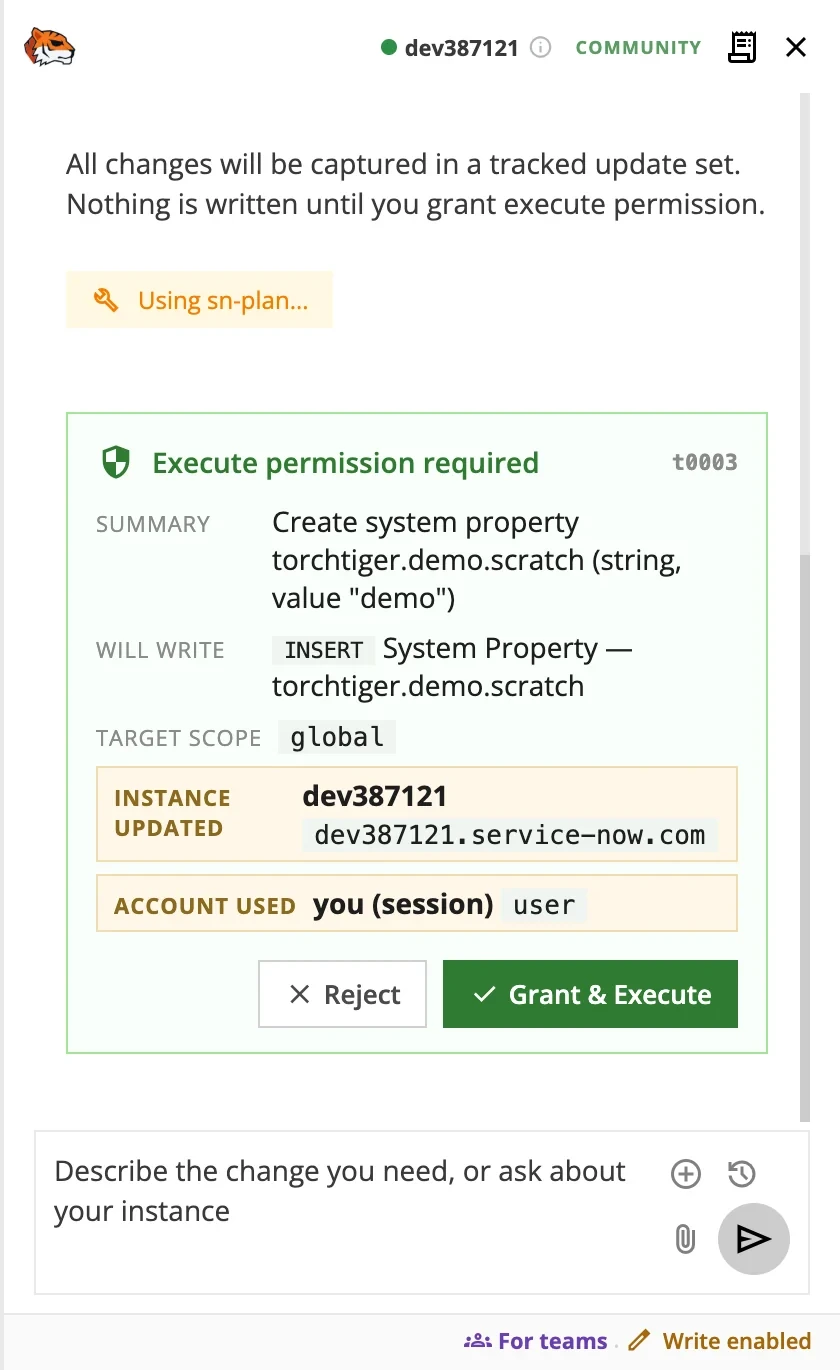
In write mode, one approval covers a turn's writes. Approved plans run in their own tracked update set; the change log can revert them.
Start Free in Four Steps
No account — your key stays encrypted on your device
-
01
Add the Extension
Add the free extension to Chrome or Edge. There's no sign-up and no account to create.
-
02
Get an Anthropic Key
Create a key at the Anthropic Console and add a little credit — that's what covers your AI usage.
-
03
Connect Your Key
Paste your key into the extension and set a passphrase to encrypt it. Enter that passphrase to unlock it; it locks again after an hour or when you close the browser.
-
04
Ask Your Instance
Open the panel on your dev instance. Engineer starts read-only — ask a question or describe a change.
How Redaction Works
Detected personal data is scrubbed in your browser before your text and ServiceNow results are sent
On-Device Detection
Personal data is found and replaced right in your browser — nothing leaves your machine just to be scrubbed.
Swapped Out, Then Back In
Detected values become placeholders before your text and ServiceNow results are sent, then swap back in the answer. You always see the real values.
You See What Was Replaced
As messages and results are sent, a card lists each replaced value once per conversation. A second pass replaces any that reappear in the conversation.
Built to Pass Your Security Review
Your reviewers can read the source and confirm Community never contacts TorchTiger
Source Shared for Review
The repo isn't public, but we share the full source with enterprise security teams on request, under NDA — reviewers see exactly what it does.
Verify the Build
The source we share includes a per-file SHA-256 checksum list, so your reviewers can confirm the installed files match the code they read.
Zero Telemetry
Community calls no analytics endpoint. On Community, nothing about your prompts or your instance is sent to TorchTiger, and the source shows it.
Rolling It Out to a Team?
Perfect for one developer — less so for a team
On a team, you don't want guardrails each person can toggle — you want them enforced for everyone. That's Team: governed for the whole team, on your own Claude, flat at $20/dev/mo.
- Redaction enforced for everyone, not a per-person toggle
- A central change log of every AI change, with a read-only auditor role
- One AI profile for everyone: Anthropic, Amazon Bedrock, or your gateway
- Production locked out; writes allowed only where you say
Members sign in to the TorchTiger-hosted Hub. Each browser checks in with TorchTiger every 15 minutes and sends it a record of every AI change. Team rules apply while a member’s seat is verified; a browser that can’t reach TorchTiger for 72 hours falls back to Community rules.
Common Questions
Is the Community Edition really free?
Yes. There's no TorchTiger subscription and no account to create. You bring your own Anthropic API key and pay Anthropic directly for your own AI usage, at their rates — nothing routes through us.
Do you see my Anthropic key or my prompts?
No. Your key and prompts go straight from your browser to your Anthropic account. Because nothing routes through us, there's no TorchTiger copy of your data.
Where is my API key stored?
On your device, encrypted at rest under a passphrase only you know, and never sent to TorchTiger. It's zero-knowledge: you unlock it each session and we can't read it. There's no recovery — if you forget it, choose Reset, set a new passphrase and re-enter your key. Your change log stays; chat clears. Signing in to Team on this browser deletes its Community key, saved chats and change log.
Can it change things in production?
Never. On production the AI is locked: no chat, no AI reads, no writes. It also stays off on any instance it can't confirm is non-production. To decide, it reads two of the instance’s own system properties on each page load, not its URL.
Is it open-source? Can we review the code?
No — it isn't open-source and the repo isn't public. But we share the full source with enterprise security teams on request, under NDA. The source we share includes a per-file SHA-256 checksum list, so you can confirm your install matches the reviewed code.
How good is the PII redaction?
On-device field rules, patterns, and a name classifier catch emails, card numbers, IP and MAC addresses, North American phone numbers and many personal names. Known ServiceNow person, email and phone fields are always replaced. UK National Insurance numbers, postcodes and UK-format phone numbers are not detected, and attached images and PDFs are not redacted. A card lists what was replaced as each message or result is sent.
Will it write to my instance on its own?
Only with your approval. Write mode is off by default. Each plan is shown for approval, and one approval covers every write in that turn. Approved writes run in their own tracked update set, and you can revert them from the change log. In write mode it may switch your current application scope without asking; record creates, updates and deletes always wait for your approval.
Start Free — No Account Needed
The Community Edition is free. Add it to Chrome or Edge, bring your own Anthropic key and ask your instance anything. Nothing routes through us.
Notify Me About Community- Free Community Edition
- No account, no server
- Your own Anthropic key
- Locked out of production