

Start Your ServiceNow® Store App Before Your Partnership Comes Through
Store readiness, for app builders and product owners.
TorchTiger Engineer runs in your browser on your development instance. It runs 15 rule checks on your scoped app as you build, drawn from the Store certification self-test and ServiceNow scan checks, scores it out of 100 and tells you what would block submission. Fix it with a plan you approve.
From Prototype to Submission
Know where your app stands at every step, not only at the end
-
Prototype the Idea
Try it on a free personal developer instance from the ServiceNow Developer Program, which offers them to learn, explore and experiment.
-
Start in the Partner Program
The Build Partner Program’s Access level gives you ServiceNow tools and development resources without full enrollment. Build the app while your partnership comes through.
-
Check It as You Build
Engineer runs its 15 rule checks on your app and shows what would block submission, with a fix for each.
-
Submit From Your Vendor Instance
Run the ServiceNow Certification Self-Test Tool there. Engineer keeps it on your list of submission tasks, and Copy review comments gives you the notes for your exceptions. Then you submit, and ServiceNow reviews the app.
What Store Readiness Shows
Rule checks that run in your browser, on the records of your app
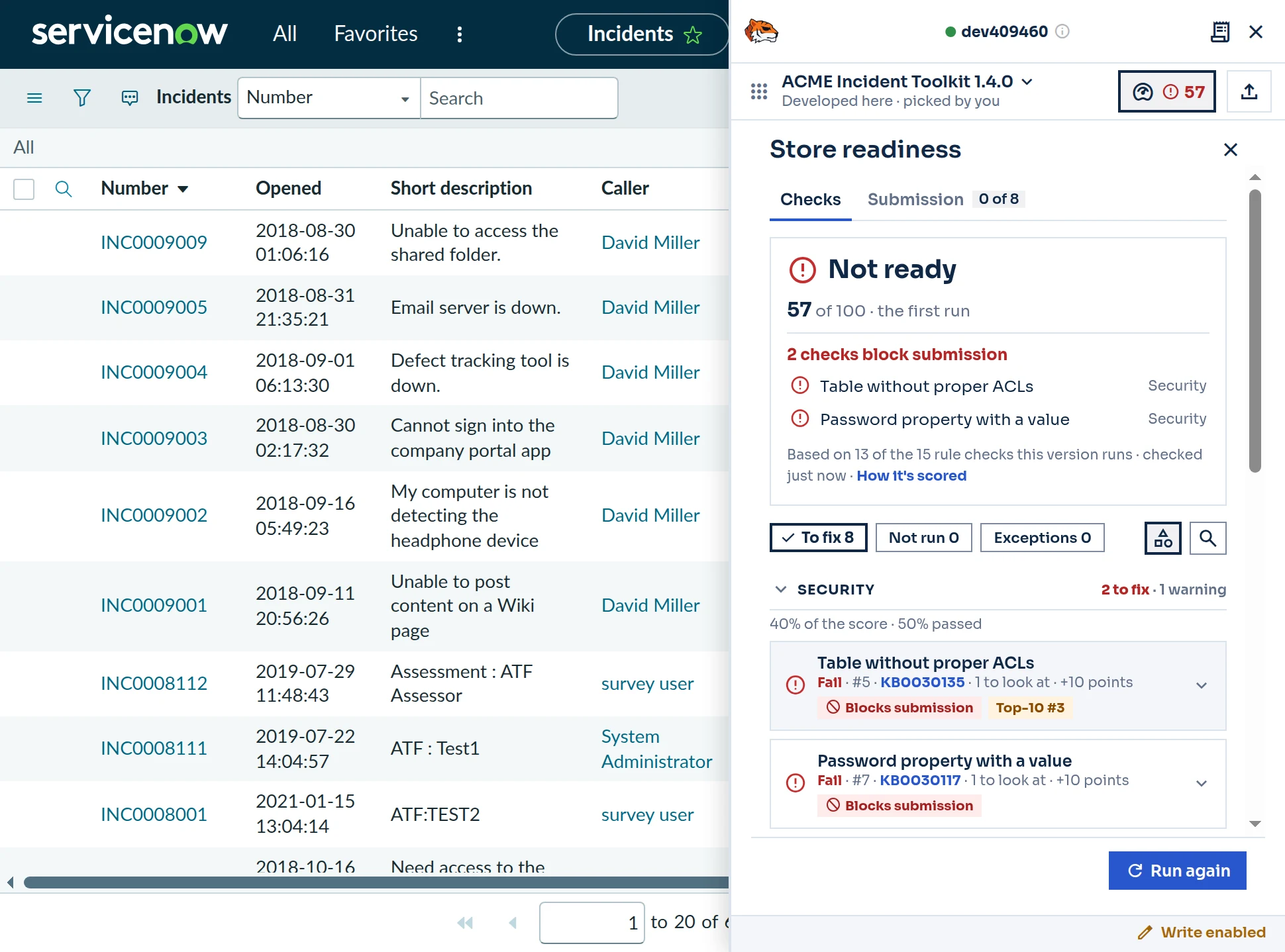
Where Your App Stands, at a Glance
Pick your app in the panel and run the check. Here, a demo app on its first run scores 57 of 100, and two security checks would block submission. Each failure shows what it found and the points its fix is worth. Fix them, then run it again.
What Would Block Submission
A score out of 100 and a band (Ready to submit, Nearly ready or Not ready), then the checks that would block submission, each with what it found.
15 Rule Checks
Credentials in scripts, tables without ACLs, public ACLs, broad cross-scope access, plain http:// endpoints, hard-coded sys_ids, debug logging and more, drawn from the Store certification self-test and ServiceNow scan checks.
Exceptions, With a Reason
When a finding is intended, mark it as an exception with a reason. Copy review comments gives you the notes for the self-test.
Ask If It’s Ready
Ask in the chat whether an app is ready. Engineer runs the checks and sums them up.
Before You Submit
What the instance can’t show, as a task list: the Self-Test, the version, the documents, load and performance, the privacy policy and accessibility.
Fix, Then Publish
Fix asks for the fix in the chat, and each change is a plan you approve. Then commit the app to Git and publish the new version to your company’s app repository.
Keep What You Built
So your prototype can become the app you submit
Commit It to Git
A developer instance that isn’t used can be reclaimed. Once your app is linked to a Git repository, commit it from the panel, so your work doesn’t go with the instance.
Ask for Conversion
When you join, ask ServiceNow to convert the developer instance you built on into your vendor instance. Copying the app to a new vendor instance means rebuilding it under your vendor prefix.
What It Does — and What It Doesn’t
Stated plainly, before you rely on it
It Does
- Run its 15 rule checks in your browser, on any development or sub-production instance you can sign in to
- Read the app’s records from the instance in your tab, and send nothing anywhere to run the checks
- Change the instance only through a plan you approve, with write mode on
It Doesn’t
- Certify your app or guarantee it passes — ServiceNow decides certification
- Submit your app to the ServiceNow Store — you submit it from your vendor instance
- Send your code to TorchTiger, or run on production
Want Someone to Take It From Here?
XpertApps, a paid service from TorchTiger’s maker, builds Store apps and prepares them for the ServiceNow certification review, and its planner lays out the path from a developer instance. The ServiceNow Partner Finder lists other partners.
Common Questions
What does Store readiness check?
This version runs 15 rule checks on a scoped app, drawn from the Store certification self-test and ServiceNow scan checks. They look for credentials in scripts, tables without ACLs, public ACLs, UI actions with no condition or role, broad cross-scope access, plain http:// endpoints, hard-coded sys_ids, debug logging, and slow calls such as gs.sleep. You get a score out of 100 and the checks that block submission.
Can we build our Store app on a personal developer instance?
Prototype there. ServiceNow offers personal developer instances to learn, explore and experiment, and its Developer Program Agreement rules out business use. To build the app itself, the Build Partner Program’s Access level gives you ServiceNow tools and development resources without full enrollment.
Can our prototype become the app we submit?
It can carry over if ServiceNow converts the developer instance you built on into your vendor instance, so ask for that when you join. Copying the app to a new vendor instance means rebuilding it under your vendor prefix, because ServiceNow publishes an app only under its owner’s prefix.
Do we need a vendor instance to use Store readiness?
Not for TorchTiger Engineer’s own checks, which run on any development or sub-production instance you can sign in to. The ServiceNow Certification Self-Test Tool runs only on a vendor instance: run it there before you submit, and Store readiness keeps it on your list.
Does Store readiness guarantee certification?
No. ServiceNow decides certification, and its review covers more than any tool can check. TorchTiger Engineer shows what would block submission before you submit, so you can fix it while it’s still in development.
Is Store readiness free?
Yes, in the free Community Edition. The checks run in your browser and cost nothing to run. Asking about the results in the chat uses your own Anthropic key, and you pay Anthropic directly for that.
Can our support team use it once the app is live?
Yes. Your support team can ask TorchTiger Engineer what an error in your app means and answer the customer, and hand your developers a write-up when the app needs a fix. See how support teams use TorchTiger Engineer.
Does our code go to TorchTiger?
No. On the Community Edition the checks run in your browser, and nothing is sent anywhere to run them. When you ask about a finding in the chat, it goes to your own Anthropic account, as every chat does. Nothing routes through TorchTiger. Security has the details.
Check Your App on Your Own Instance
Add the free Community Edition, open your app on a development instance, and ask whether it’s ready for the Store.
Get the Community Edition- Free Community Edition
- 15 rule checks in your browser
- Nothing sent to run them
- Locked out of production