

Walkthrough · 1:27 ·
ServiceNow UI Action Missing in Workspace: Find Why, Fix It
TorchTiger Engineer finds why a team's Escalate button is missing in Service Operations Workspace, then adds it there once you approve its plan.
The Escalate UI action's workspace setting was off, and its classic script cannot run in a workspace. TorchTiger Engineer planned the settings and a workspace script, and wrote them after you approved.
Transcript
- 0:00
Here you're on an incident in Service Operations Workspace, and your team's own Escalate button, which works fine on the classic form, isn't anywhere in this header. You want it here too, working, without breaking the classic one.
- 0:13
So you open TorchTiger Engineer, a side panel for ServiceNow developers that reads your instance, and ask it why your button is missing from this page.
- 0:22
First it looks up your Escalate button on this instance, then reads how it's set up.
- 0:26
On the button's own record it finds what's wrong, a workspace setting that's switched off.
- 0:31
And it warns you that the classic script won't work there as written.
- 0:34
Then you ask it to bring Escalate here as well, without touching the classic form's button, its script, or who is allowed to see it.
- 0:41
Next it searches the web for how a workspace button is built, checks which app it's writing into, and drafts its plan.
- 0:48
Its plan keeps the same button and server code, and adds a script for the workspace.
- 0:53
Nothing is written until you approve, with Grant and Execute.
- 0:57
You press it, and it creates an update set for the work, then updates the Escalate button.
- 1:03
Reading the record back, it reports everything else as before, the classic script and condition included.
- 1:08
Now Escalate shows.
- 1:10
You click it, and it asks for a reason.
- 1:13
You type VIP caller and press OK.
- 1:17
Your reason is saved as a work note, so your own test shows Escalate working here too.
- 1:22
Try TorchTiger Engineer on your own dev instance, at torchtiger dot com.
-
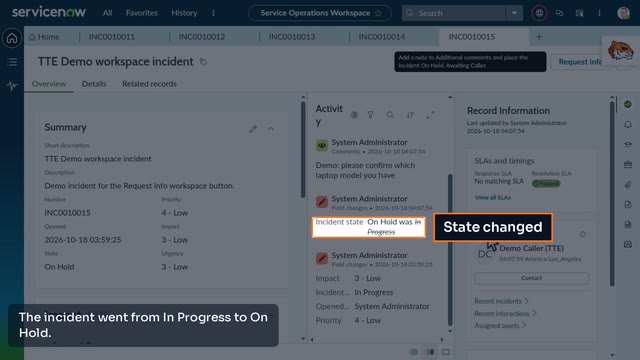
Add a Request Info Button to Service Operations Workspace
TorchTiger Engineer adds a workspace button that saves a note as a comment and puts the incident on hold, after you approve its plan.
Ask Your Own Instance
The free Community Edition runs in Chrome or Edge on your own Anthropic key. Try the same question on your dev instance.
Get the Community Edition- Free — bring your own Anthropic key
- Read-only by default
- Plan & approve before any AI change
- Locked out of production