

Product overview · 1:09 ·
Introducing TorchTiger Engineer: AI Coworker for ServiceNow®
TorchTiger Engineer explains a demo ServiceNow app, runs the Store readiness checks, fixes one line once you approve, and answers a support question.
TorchTiger Engineer is an AI coworker inside your ServiceNow instance that reads your app and writes nothing until you approve. On our developer instance, it explains a demo ServiceNow app's records and runs the Store readiness checks. It fixes one flagged line after you press Grant & Execute, then answers a customer's question from the business rule.
What Happens on Screen
This film has background music and on-screen captions, no voice-over. This is what it shows, in order.
- 0:00
You build ServiceNow Store apps.
- 0:03
Reviews. Fixes. Support. All on you.
- 0:07
An AI coworker inside your ServiceNow instance.
Full transcript (26 lines)
- 0:09
It reads your app. You approve every change.
- 0:11
Understand your app
- 0:13
Ask in plain words.
- 0:15
It reads your app's records first, then explains how they connect.
- 0:18
From the button to the rule it fires.
- 0:20
Get it Store-ready
- 0:22
One question runs the Store readiness checks.
- 0:25
86%. Not ready. 5 blockers, each with its fix.
- 0:27
Down to the line. gs.log() in TicketRouter, line 9.
- 0:29
Ask for the fix.
- 0:31
A plan comes first. Nothing is written until you approve.
- 0:35
You press Grant & Execute.
- 0:38
It writes the change, then reads it back: no fields dropped or changed.
- 0:41
One line. gs.log() becomes gs.info().
- 0:43
In its own update set. One update, on record.
- 0:45
Answer support from the app
- 0:47
A customer asks: can we set our own escalation endpoint?
- 0:49
It reads the business rule behind it.
- 0:50
The answer: it's written into the script. With a developer write-up, ready to hand over.
- 0:54
Every change, on record
- 0:56
Every change it makes, in one log, by update set, with Revert at hand.
- 0:58
IN THIS RUN 1 line changed, gs.log to gs.info 0 fields dropped, read back 1 update set, on record
- 1:01
Research. Approve. Build.
-
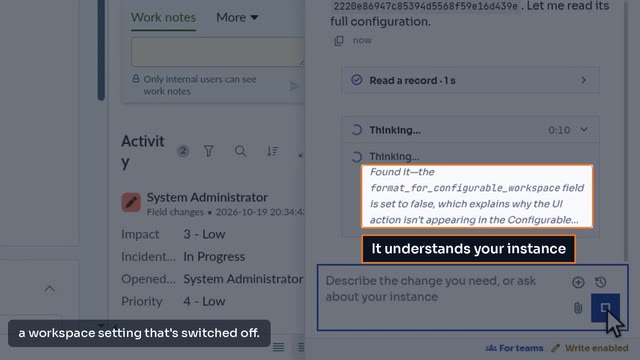
ServiceNow UI Action Missing in Workspace: Find Why, Fix It
TorchTiger Engineer finds why a team's Escalate button is missing in Service Operations Workspace, then adds it there once you approve its plan.
-
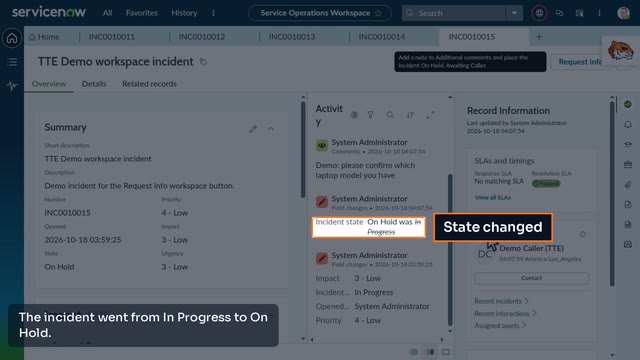
Add a Request Info Button to Service Operations Workspace
TorchTiger Engineer adds a workspace button that saves a note as a comment and puts the incident on hold, after you approve its plan.
Ask Your Own Instance
The free Community Edition runs in Chrome or Edge on your own Anthropic key. Try the same question on your dev instance.
Get the Community Edition- Free — bring your own Anthropic key
- Read-only by default
- Plan & approve before any AI change
- Locked out of production